SMS & WhatsApp Messaging
ScoriGame offers optional SMS and WhatsApp notifications. You are never required to receive them to use ScoriGame, and you can turn them off at any time.
How you opt in
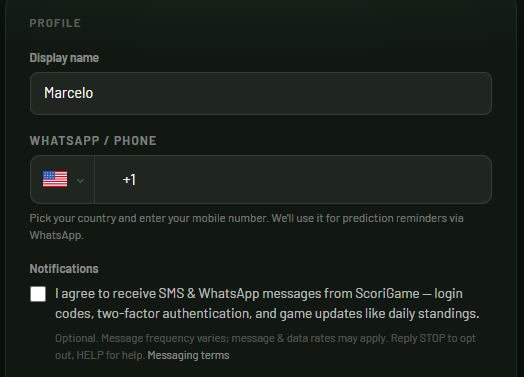
You opt in by checking the “receive SMS & WhatsApp messages” box when you create your account, or by enabling it later under Settings → Notifications. The box is unchecked by default — messages are only sent if you choose to turn them on.
What we send
- Account & security — login (one-time passcode) and two-factor authentication codes.
- Game updates — information about the pools you take part in, such as daily standings, match results, and prediction deadlines.
We do not send marketing or promotional messages from third parties.
Message frequency
Message frequency varies depending on the pools you join and game activity (for example, around match days). Message and data rates may apply, depending on your mobile plan.
Opting out and help
- Reply STOP to any message to unsubscribe at any time, or turn off notifications under Settings → Notifications.
- Reply HELP for assistance, or contact us at marcelocouto@gmail.com.
Privacy
We use your phone number only to send the messages you have opted into. We do not sell, rent, or share your mobile phone number or messaging opt-in with third parties or affiliates for their own marketing purposes. For full details, see our Privacy Policy.
Contact
Questions about ScoriGame messaging? Contact us at marcelocouto@gmail.com.